
Video Schema for AI Search: VideoObject and Clips
Learn how VideoObject and Clip schema markup help small businesses get cited in ChatGPT, Perplexity, Claude, and Gemini answers. Practical steps for US companies.
Updated July 28, 2026 · 12 min read
Table of Contents
TL;DR: VideoObject schema gives AI engines clear metadata on your videos so they extract and cite them accurately. Adding Clip markup breaks videos into timestamped segments that match common questions. Businesses using both see higher citation rates across ChatGPT, Perplexity, and Google AI Overviews. Start with JSON-LD on pages that host or embed video, include transcripts, and test with Google's rich results tool.
Small business owners now compete for space inside AI answers the same way they once competed for the top spot on Google. When someone asks ChatGPT or Perplexity how to fix a leaky faucet or choose accounting software, the engine pulls from web content it trusts. Video often carries the clearest explanation, yet most videos stay invisible to these systems because the metadata is missing.
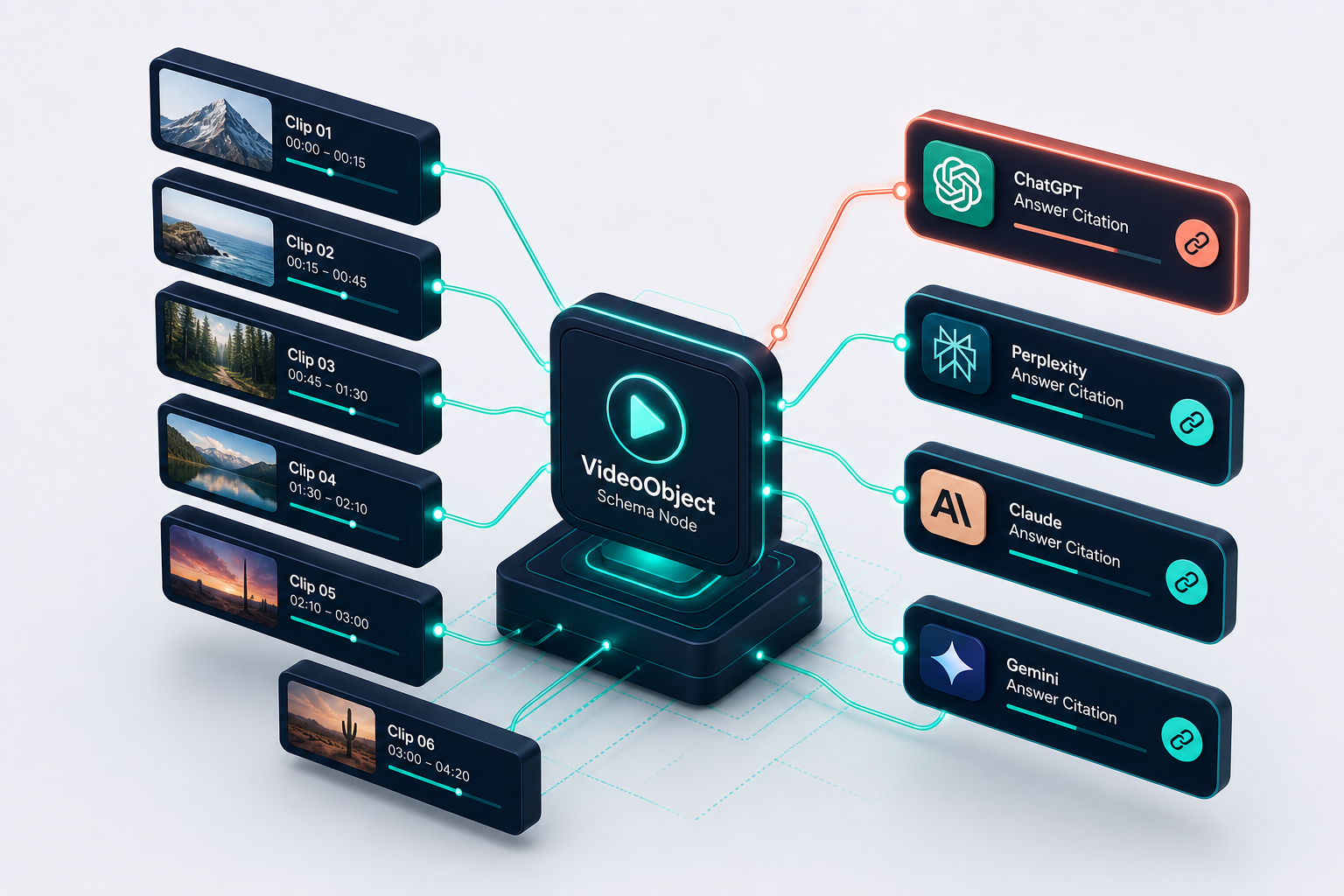
VideoObject schema tells the engine the video title, length, thumbnail, upload date, and what the video covers. Clip schema goes further by marking exact start and end times for key sections. Together they turn a video into extractable chunks an AI can quote directly in its response.
This matters for any US company that produces how-to videos, product demos, or customer stories. Without the markup, the engine may ignore the video or guess at its content. With it, the same video can appear as a cited source or even a suggested clip inside an AI-generated answer.
How AI Engines Handle Video in 2026
ChatGPT, Claude, Perplexity, and Gemini all read schema markup when they crawl pages. Tests run in late 2025 showed these engines process VideoObject data to understand video topics and relationships to surrounding text. Pages that include the markup see more frequent mentions in generated answers.
Perplexity in particular favors fresh, well-structured video content. When a video carries clear metadata and a transcript, the engine can surface the exact moment an answer appears rather than linking the whole file. Google AI Overviews also pull from top organic results that carry VideoObject markup.
The pattern is consistent. Engines still rely on traditional ranking signals first. Once a page ranks, schema determines whether the video gets pulled into the synthesized response. Companies that skip the markup leave easy citations on the table.

AI engines process VideoObject and Clip schema to extract precise video segments for citations.
VideoObject Schema Basics That Work
VideoObject is the core type from Schema.org. Google publishes the required and recommended properties on its structured data page. Start with name, description, thumbnailUrl, contentUrl or embedUrl, uploadDate, and duration.
Add the transcript property whenever possible. A full text transcript inside the schema removes guesswork for AI models that would otherwise rely on automatic speech recognition. Include creator details and interaction statistics like view count when they are accurate.
Place the JSON-LD block in the head or body of the page where the video plays. Keep the name close to the actual video title and the description focused on the main questions the video answers. This setup matches what engines look for when deciding whether to cite a video segment.
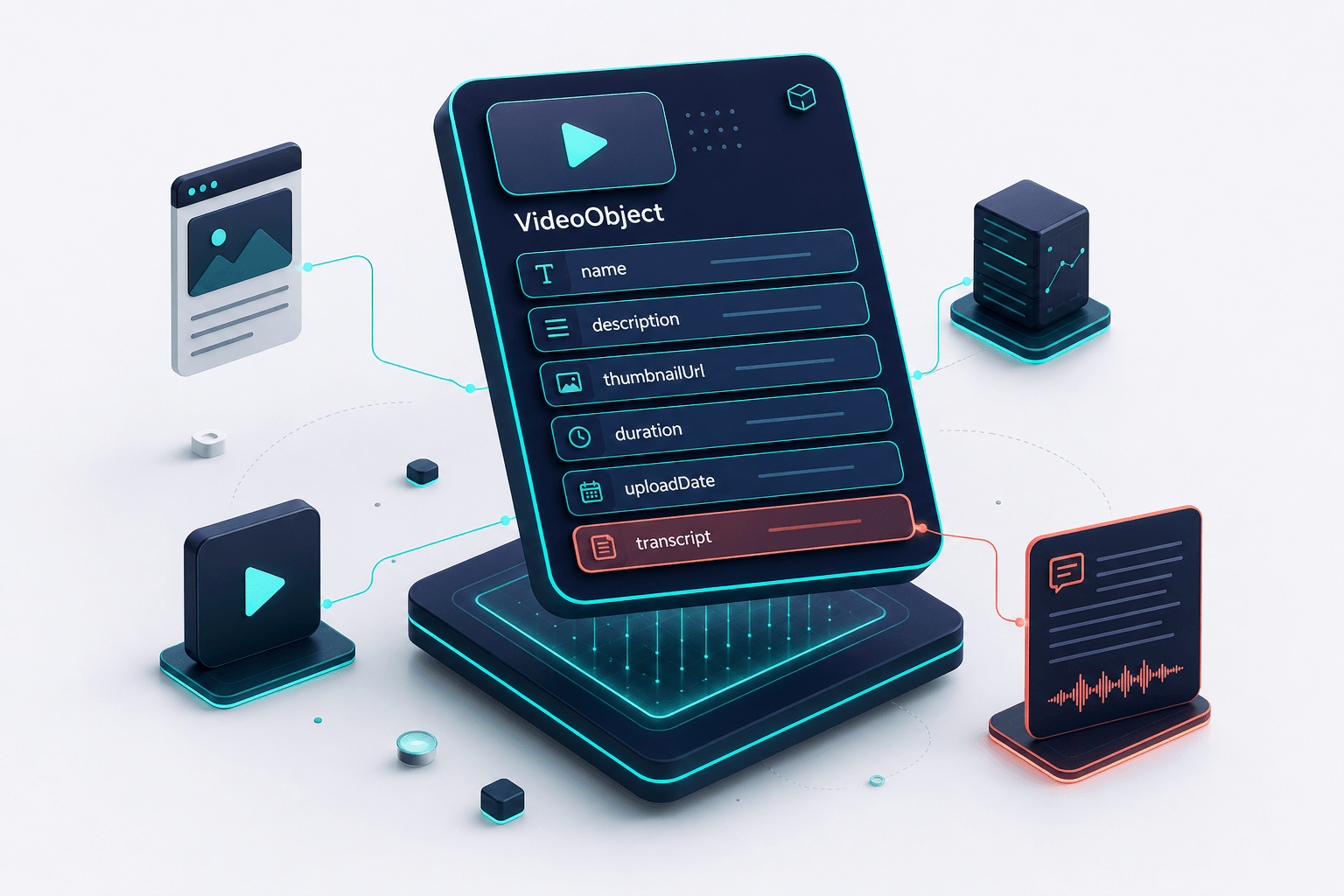
Core VideoObject properties that enable accurate AI extraction and citation.
Clip Schema for Exact AI Extraction
Clip markup sits inside the hasPart property of VideoObject. Each Clip defines a name, startOffset, endOffset, and a direct URL with a time parameter. The video must support deep linking to those seconds.
Use Clips for every section that answers a common customer question. A 10-minute product demo might have five Clips covering setup, pricing, integration, troubleshooting, and results. The engine can then point users straight to the relevant 90-second segment.
This approach improves citation precision. Instead of saying "watch this video," an AI answer can reference the exact moment the pricing comparison happens. Recent multimodal content guides note that pages layering VideoObject plus Clip markup achieve higher citation rates than text-only pages on the same topic.
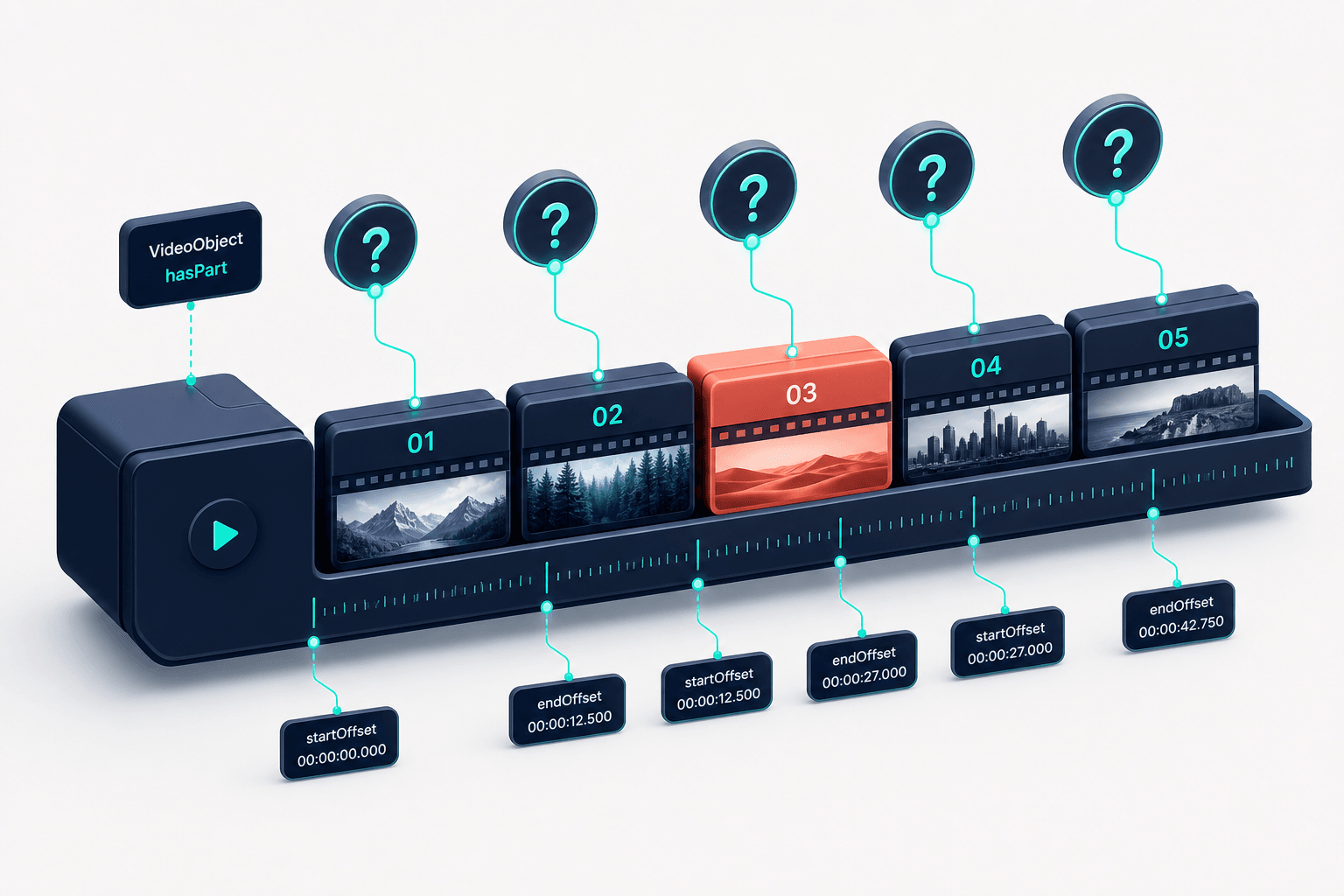
Clip segments enable AI engines to cite exact video moments instead of entire files.
Step-by-Step Implementation for a Typical Page
Pick a page that already hosts or embeds your video. Generate the JSON-LD using a validator or manual code. Include the main VideoObject first, then nest the Clip objects.
Validate the markup with Google's Rich Results Test. Fix any errors before publishing. Re-test after any video update because duration and timestamps must stay accurate.
For multiple videos on one page, use separate VideoObject blocks or an ItemList wrapper. Each video needs its own complete set of properties. Do not rely on fragment identifiers for the main video URL; use clean deep-link parameters instead.
Common Mistakes That Block Citations
Many sites add VideoObject but leave out the transcript or Clip data. The engine then treats the video as a black box and rarely cites it. Others use the wrong page type, such as Article schema alone, when the video is the primary content.
Outdated timestamps break deep links. Always update the schema when you edit or replace a video. Blocking the thumbnail image in robots.txt prevents the engine from displaying the video in results.
Finally, some businesses place schema only on YouTube pages and skip the pages where the video is embedded on their own site. Engines crawl both locations, but the site page often carries stronger entity signals for the brand.
Measuring Results Across AI Platforms
Track citations manually at first. Run the same question in ChatGPT, Claude, Perplexity, and Gemini once a week and note whether your video or page appears. Record the exact wording of the citation when it happens.
Watch for changes after schema updates. Many companies report increased mentions within 30 to 60 days when they add complete VideoObject and Clip markup. Combine this with standard analytics to see whether referred traffic from AI platforms rises.
Compare pages with and without the markup on similar topics. The difference in citation frequency provides a clear before-and-after signal that the schema is working.
Next Steps for US Businesses
Audit your existing video content first. List every video that answers a customer question or explains a process. Prioritize those pages for markup.
Create a simple template with the required VideoObject properties and space for five to seven Clips. Update the template each time you publish a new video. Keep the process consistent across the team.
Revisit the markup quarterly. AI engines continue to refine how they read structured data, so fresh, accurate schema stays important. The companies that treat video markup as ongoing maintenance rather than a one-time task keep earning citations.
Include a full transcript in the schema. AI engines cite videos with accurate transcripts far more often than those without.
Key Takeaways
- Add VideoObject schema with name, description, thumbnail, duration, upload date, and transcript to every video page.
- Break videos into Clips using hasPart and time offsets so AI engines can cite exact segments.
- Validate markup with Google's Rich Results Test after every change.
- Place schema on both the hosting page and any embed pages for strongest signals.
- Track citations in ChatGPT, Perplexity, Claude, and Gemini weekly to measure impact.
FAQ
Do I need VideoObject schema if my video is only on YouTube?
Yes. Add the markup on your own site pages that embed or link to the YouTube video. Engines crawl both locations and the site page often carries stronger brand context.
How many Clips should I create per video?
Start with one Clip for each major question the video answers. Five to seven Clips works well for most 8- to 15-minute videos.
Will schema alone get my video cited in AI answers?
Schema helps once the page already ranks. Combine it with strong content, clear headings, and regular updates so the engine sees the page as authoritative.
Can I use the same Clip markup on multiple pages?
No. Each page needs its own accurate schema block. Duplicate markup across pages can create conflicts that engines ignore.
Related on L3ad Solutions
Or start with a free AI visibility check
Does AI Recommend You?
See if ChatGPT, Gemini, Grok, and Claude name your business. Free, emailed in minutes.