



llms.txt Spec: What AI Crawlers Do With It
Break down the llms.txt specification and how models like ChatGPT, Claude, and Perplexity actually fetch and use the file in 2026 AI search.
Updated June 16, 2026 · 5 min read
Table of Contents
TL;DR: llms.txt is a Markdown file at your site root that gives AI systems a curated map of your most important pages and brand facts. It follows a simple structure with an H1 name, short description, and sectioned links with annotations. AI tools fetch it at inference time for accurate context instead of scraping full HTML. Major sites like Anthropic and Stripe use it, and some retrieval pipelines show measurable gains in citation quality.
Small business owners now field questions through ChatGPT, Claude, Perplexity, and Gemini instead of traditional search bars. When those models answer, they pull from whatever content they can parse quickly and cleanly. Without a clear signal, they often miss your best pages or mix up what you actually do.
What llms.txt Is and Why It Exists
llms.txt sits at yourdomain.com/llms.txt as a plain Markdown file. It was proposed in September 2024 by Jeremy Howard and lives at llmstxt.org. The goal is simple: give large language models a short, structured summary so they do not have to wade through menus, scripts, and sidebars on every page.
Traditional sitemaps list every URL. Robots.txt blocks crawlers. llms.txt does neither. It points AI systems to the pages you consider highest value and adds one-sentence context for each link.
In 2026, adoption has grown among developer-focused companies. Anthropic, Stripe, Cloudflare, Zapier, and Perplexity all publish their own llms.txt files on documentation domains. The file helps AI coding tools and retrieval systems deliver more accurate summaries without hallucinating details.
The Current Specification Structure
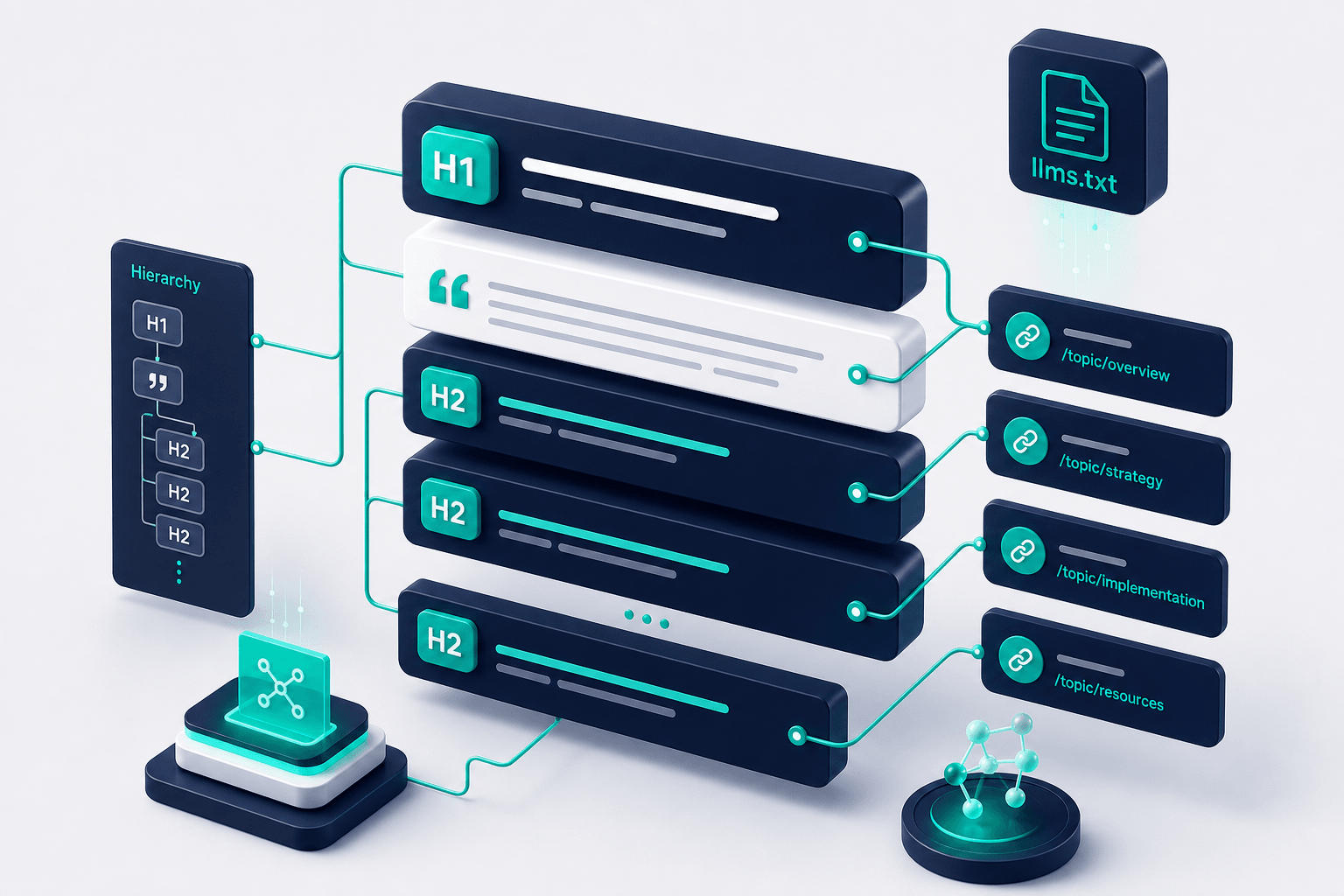
Version notes from early 2026 show a minimal but consistent format. Start with a single H1 heading that holds your brand or site name. Follow immediately with a blockquote of one to three sentences that describe what the site covers and who it serves.
Next come optional context paragraphs for any facts an AI should know upfront, such as service area or core offerings. Then use H2 headings to group pages by topic, like Products, Services, or Resources.
Under each H2, list links in Markdown format with a short description after the URL. Keep descriptions factual and written for a reader who knows nothing about your business. The spec stays loose on length but rewards brevity because AI context windows are limited.
How AI Crawlers Actually Fetch and Use the File
AI systems typically request llms.txt when a user query mentions your brand or a specific topic on your site. They read it at inference time rather than during bulk crawling. The file gives them a ready-made index so they can jump straight to the right pages instead of guessing.
Perplexity has shown stronger support in experiments, with one test reporting nearly doubled referral traffic after adding a well-structured file. Other models from OpenAI and Anthropic have been observed fetching both llms.txt and a companion llms-full.txt version in developer pipelines.
Developer tools such as Cursor and GitHub Copilot already parse the file when it is present. They use the annotated links to build more accurate code or answers. General consumer chat interfaces show less consistent behavior so far, but the file remains forward-compatible as retrieval methods improve.

What the File Does Not Control
llms.txt does not block any crawler. Robots.txt still handles access rules for every major AI bot, including GPTBot, ClaudeBot, and PerplexityBot. Adding llms.txt changes nothing about whether a model is allowed to visit your pages.
It also does not guarantee citations or rankings. No major provider has published official confirmation that they weight llms.txt content in every answer. Some tracking studies show low direct crawl rates for the file itself compared with regular content pages.
Treat it as helpful guidance rather than a guarantee. The real benefit appears when AI systems decide to read it for brand accuracy or when developers use it inside their own tools.
Real Examples From Published Files
Perplexity publishes a clean version on its docs site. It opens with the product name, a brief description, and then sections such as API reference with individual endpoint links and one-line notes.
Stripe and Anthropic follow the same pattern on their developer documentation. They list getting-started guides, reference material, and support pages with short annotations that tell an AI exactly what each page contains.
These examples stay short, usually under 2,000 words total, so models can ingest them without hitting token limits.

How to Build One for Your Business Site
Begin by listing your ten to fifteen most important pages. Focus on service descriptions, about information, pricing if public, and any evergreen explainers that answer common customer questions.
Write the H1 and opening blockquote first. Then create H2 sections that match how customers think about your offerings. Add the URL and a single sentence that explains the page purpose.
Host the finished file at the exact root path. Update it whenever your core offerings change so the map stays current. Test by visiting the URL in a browser and confirming the Markdown renders cleanly.
Where llms.txt Fits in a Broader AI Search Plan
Pair the file with clean page content, clear headings, and factual language that models can quote directly. Keep schema markup up to date for entity clarity. Maintain a standard XML sitemap so traditional discovery still works.
Monitor brand mentions inside ChatGPT, Claude, Perplexity, and Gemini answers over time. Track which pages get cited most often and adjust the llms.txt links accordingly.
The file is one small, low-cost piece. It works best alongside consistent publishing of useful content that answers real customer questions.
Place it at exactly https://yourdomain.com/llms.txt. Any subdirectory or different filename reduces the chance an AI system will find it.
- Create the file with one H1, a short blockquote description, and H2 sections that group your key pages with one-sentence annotations.
- Host it at the root so any AI retrieval step can reach it without extra clicks.
- Update the content whenever your main offerings or important pages change.
- Use it together with robots.txt for access control and schema for entity facts.
- Measure results by checking how often your brand appears in AI answers and which pages get cited.
Tap a question to expand.
Does llms.txt replace robots.txt for AI bots?
Will adding llms.txt guarantee I get cited in ChatGPT or Perplexity answers?
How often should I update the file?
Is llms.txt only useful for tech or documentation sites?
Or start with a free AI visibility check
Does AI Recommend You?
See if ChatGPT, Gemini, Grok, and Claude name your business. Free report by email.