



How to Write a Google Review: Step-by-Step Guide
How to write a Google review: step-by-step instructions, what makes feedback useful, and why reviews decide which local businesses show up first.
Updated March 16, 2026 · 12 min read
Table of Contents
Why Should You Learn How to Write a Google Review?
If you want to support your favorite local businesses or help others make informed decisions, knowing how to write a review on Google is essential. Popular review websites, such as Google, Yelp, and Facebook, play a major role in shaping a business's online reputation. This complete guide is designed for both customers who want to share their experiences and business owners who want to educate their clients. Here, you’ll find a step-by-step walkthrough, expert tips for writing effective reviews, and answers to the most common questions about Google reviews.
Did you know that 64% of consumers look to Google for reviews before visiting a business, and 81% of customers used Google to access local and small businesses in their area in 2022?
Whether you’re a consumer looking to highlight great service or a business owner aiming to boost your online reputation, understanding the process and best practices for Google reviews can make a real difference. Managing a business's online reputation is crucial for attracting more customers and improving business online visibility. For local businesses, especially on Florida’s Space Coast, Google reviews directly impact visibility, trust, and customer growth. For consumers, reviews help others choose the best services and products in their area.
What Is a Google Review and How Do You Write One Quickly?
A Google review consists of a star rating and an optional written opinion that you post on a business’s Google Business Profile.
Quick steps: Sign in to your Google account, search for the business in Google or Maps, click the review count or stars, tap “Write a review,” choose from 1 to 5 stars (with five stars being the highest rating), add clear details about your experience, then post. The whole process takes just a few minutes.
For local businesses here on Florida’s Space Coast, these reviews directly affect how often you show up when someone searches for services nearby. Every honest review from a real customer helps potential customers make informed decisions and helps good businesses stand out.
Why Do Google Reviews Matter for Small Local Businesses?
Google reviews impact how often a business shows up in local search results and how many people actually call or visit. When someone searches for a service in their area, Google uses reviews as one of the signals to decide which businesses deserve the top spots.
Across our Space Coast clients in Titusville, Cocoa, and Melbourne, businesses with 50+ reviews get about 28 to 35% more calls than similar competitors with under 10 reviews. That’s not a small difference. For a local business, that could mean several extra jobs per month.
Here’s why this happens:
- 83% of consumers use Google to check local business reviews before visiting or calling
- 95% of consumers trust businesses with many reviews over those with few
- Reviews with specific details and photos build more trust than generic “Great service!” comments
The connection between online reviews and visibility comes down to trust signals. Google wants to show searchers the most reliable options. A business with dozens of recent reviews, a solid star rating, and actual customer feedback looks more trustworthy than one with three reviews from 2019. Positive reviews matter a lot for every business, especially for multi-location enterprises that need to build a stronger online reputation. Managing your business's online reputation through consistent review generation and monitoring is essential for long-term success. If you want to understand how this fits into a broader local SEO services strategy, reviews are one piece of a larger puzzle that includes your website, your Google Business Profile, and how consistently your business info appears across the web.
Boost Visibility
Reviews influence local search rankings, helping businesses appear higher in results.
Build Trust
Detailed feedback and high ratings make businesses more credible to potential customers.
Drive Engagement
Positive reviews lead to more calls, visits, and inquiries from searchers.
How Do You Write a Review on Google from a Computer?
Sign into your Google account, search for the business, click the review count or stars, choose “Write a review,” pick your star rating, and type your experience. That’s the core process. Reviews left by customers are visible on the business's Google Business Profile and in search results, helping potential customers see real feedback and build trust.
How Can You Write a Google Review on Desktop Step-by-Step?
- Open Google.com or Google Maps in your browser.
- Search for the business by name (add the city if needed, like “AC repair Titusville”).
- Find the business listing in search results or on the map.
- Click on the review count (the number next to the stars) or the “Write a review” button.
- Select your star rating from 1 to 5 stars.
- Write your review in the text box.
- Add photos if you have them.
- Click “Post”.
If the business has multiple locations, double-check the address before posting. You don’t want to review the Orlando branch when you meant to review the Melbourne location. Look for the full street address and city in the listing.
Reviews you write appear on the business’s Google Business Profile and show up in both Google Search and Google Maps. Other customers will see your feedback when they’re researching the same business.
You can edit or delete your own review later if needed. Go to Google Maps, click your profile icon, then “Your contributions,” then “Reviews.” From there, you can update or remove any review you’ve written.
Double-check the business address before posting to ensure you're reviewing the correct location, especially for businesses with multiple branches.
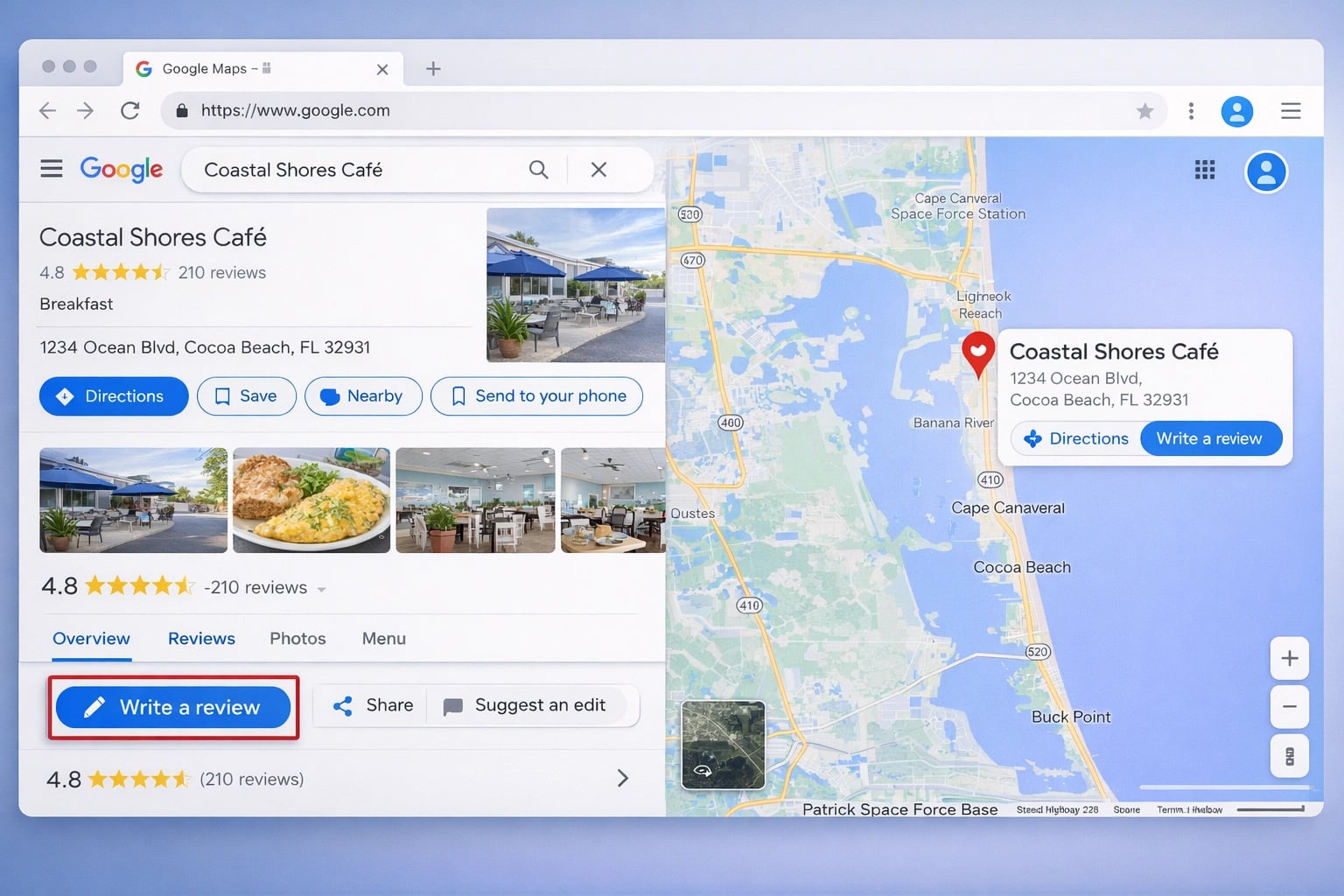
Navigating Google Maps to leave a review is straightforward, search, click, and share your experience.
How Can You Write a Google Review on Google Search (Desktop)?
Open google.com in your browser, which is the Google search engine, and type the business name plus the city (for example, “roof repair Cocoa Beach”). Using the search engine, look for the knowledge panel on the right side of the screen. This is the box that shows the business name, address, phone number, photos, and star rating.
Click on the blue review count (like “47 reviews”) or look for a “Write a review” link. A popup will appear asking you to select 1 to 5 stars. After you choose your rating, a text box opens where you can type your review.
Write a short, specific paragraph covering what you bought or what service you received, how the staff treated you, how long things took, and the outcome. Skip personal contact info like your phone number or email in the public review text. That information doesn’t help other customers and could create privacy issues for you.
How Do You Use Google Maps on Desktop to Write a Review?
Go to maps.google.com in your browser and search for the business name. Click on the correct listing from the results. The business details panel will open on the left side of the screen.
Scroll down to the reviews section and click “Write a review.” You’ll see the same star selection and text box as in Google Search.
Maps works especially well when you’ve recently visited the location, since your location history may suggest places you’ve been. For project-based services, desktop is often easier for uploading before-and-after photos since you can drag images directly from your computer.
How Do You Write a Review on Google from Your Phone?
Mobile is often the easiest way to leave reviews, and you can do it right from your mobile device in just a few minutes. You can write one right after you leave a business while the experience is fresh. Open the Google Maps app or the Google app on your mobile device, find the business, scroll to the reviews section, and tap “Write a review.”
You need to be signed into a Google account to post reviews. That account doesn’t have to be a Gmail address. You can create a Google account with any email address and use it to leave reviews.
Imagine you just finished a great meal at a restaurant in Cocoa. While you’re still at the table, you could pull out your phone, search for the restaurant in Maps, and leave a quick review mentioning your server’s name and what dish you ordered. That kind of specific feedback is way more helpful than something written weeks later from memory.
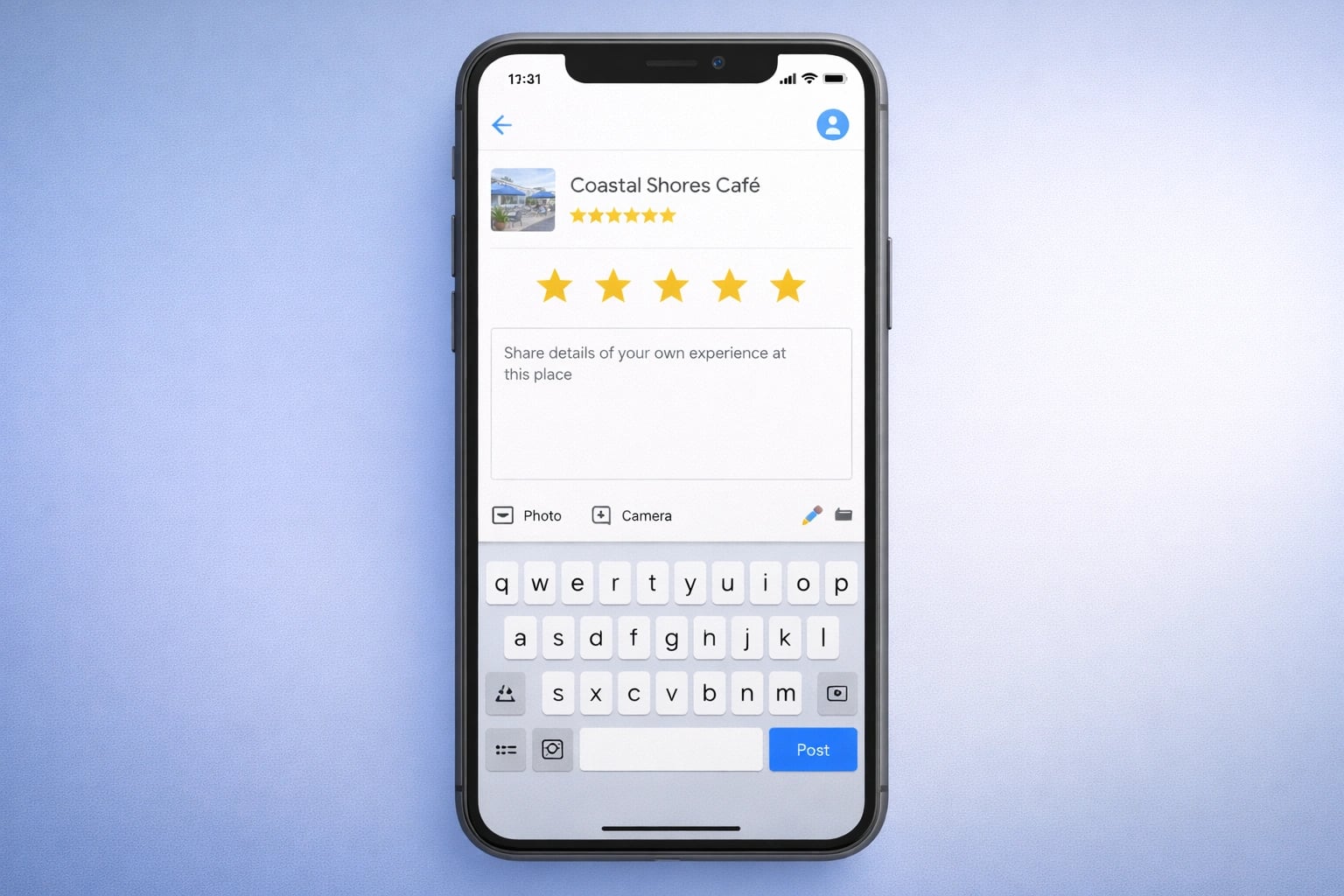
Writing a review on your phone via Google Maps is quick and convenient, especially right after a visit.
How Can You Write a Google Review on Mobile Step-by-Step?
- Open the Google Maps app on your phone.
- Tap the search bar at the top.
- Type the business name.
- Select the correct location from the results (check the address).
- Scroll down past the photos and info to find the “Rate and review” section.
- Tap on the stars to select your rating.
- A text box appears where you can add details.
- Tap the photo icon to add photos if you want.
- Tap “Post” when you’re done.
Maps often auto-suggests places you’ve recently visited. If you just drove down US-1 or A1A and stopped at a local shop or service provider, it might pop up in your suggestions, making it even faster to review.
How Do You Leave a Google Review via the Google App or Mobile Browser?
Open Chrome, Safari, or whatever browser you use on your phone. Search for the business name plus the city. Tap on the business listing in the search results. Scroll down to the reviews segment and tap “Write a review.”
The steps work almost identically on Android and iPhone. If you’re not already signed in, your browser will prompt you to sign into your Google account before you can post.
Double-check the logo and address before posting, especially for franchises or chains with multiple Florida locations. You want to make sure you’re reviewing the right branch.
What Should You Include in a Helpful Google Review?
A good review on Google provides valuable feedback and is based on a positive experience or constructive criticism. A great Google review is specific, honest, concise, and focused on what actually happened during your visit or service. Effective Google reviews should be specific, honest, concise, and based on personal experience. Generic reviews like “Good place!” don’t help anyone. Providing valuable feedback helps other customers decide if this business is right for them.
What Are the Best Tips for Writing a Helpful Review?
Effective Google reviews should be:
- Specific: Mention what you bought, what service you received, and any staff members or products involved.
- Honest: Base your review on your actual experience.
- Concise: Aim for 100–150 words to provide enough detail without rambling.
- Professional: Maintain a respectful, civil tone and avoid personal attacks.
- Constructive: If your experience was negative, focus on facts and suggest improvements.
- Photo-Enhanced: Add photos to increase credibility and trustworthiness.
- Policy-Compliant: Avoid inappropriate content, fake information, spam, or personal/confidential details.
- Proofread: Check for grammar and spelling errors before posting.
What Is a Useful Google Review Checklist?
| Best Practice | Why It Matters |
|---|---|
| Be specific about your experience | Helps others understand what to expect |
| Be honest and concise | Builds trust and keeps reviews readable |
| Remain professional and civil | Ensures your review is taken seriously |
| Avoid personal attacks or insults | Keeps your review compliant with Google’s policies |
| Include staff names or product details | Makes your review more informative |
| Add photos if possible | Increases credibility and trustworthiness |
| Follow Google’s content policies | Prevents your review from being removed |
| Do not include personal info | Protects your privacy and avoids conflicts of interest |
| Proofread before posting | Improves clarity and professionalism |
Remember: When writing a Google review, be honest, civil, and specific about your experience. Aim for at least 100 words to ensure your review remains visible and impactful. For more context on how reviews fit into search rankings, check out our SEO glossary.
- Be specific about your experience to help others.
- Keep reviews honest and concise for credibility.
- Add photos to increase trust and visibility.
- Stay professional and avoid personal attacks.
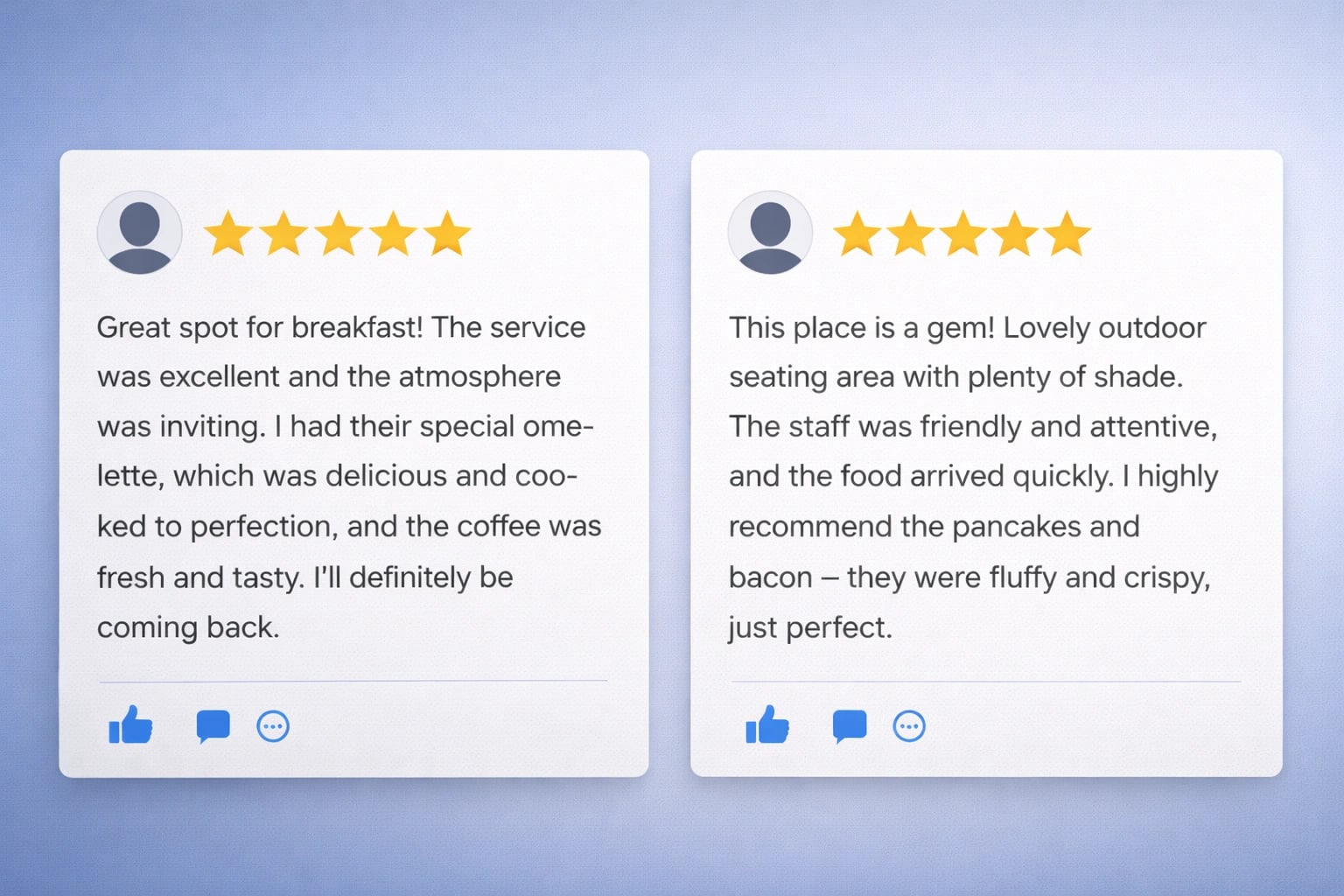
Specific reviews with details about the experience are more helpful to potential customers.
How Can You Write a Strong Positive Review?
A few simple habits make positive reviews much more useful:
- Mention staff by name if you remember (“Ask for Maria, she was great”)
- Describe a specific moment that stood out
- Share before and after results for service businesses
- Mention location convenience, parking, or hours if relevant
- Be natural, not salesy
Here’s a real pattern we’ve seen: our Merritt Island clients get more calls from reviews that show before and after photos than from ones that only say “Great job.” The photos prove the work was done well. Other customers can picture the same results for their own needs.
Four and five star reviews help good businesses stand out from fly-by-night operations. When you take the time to write something specific, you’re helping both the business and future customers who need that service.
How Should You Write a Fair but Critical Review on Google?
Critical reviews should focus on facts, not emotions. Include dates, what was promised, what went wrong, and whether the business tried to fix the problem.
Avoid threats, profanity, or accusing someone of crimes unless you have documentation. Reviews containing that content can be removed by Google for violating their policies, which means your valid complaint disappears entirely. If you come across an inappropriate review that violates Google's guidelines, you can report or flag it by tapping the menu icon next to the review and selecting the report option.
Here’s a template that works for constructive feedback:
- What you expected based on their promises or advertising
- What actually happened
- How staff responded when you raised the issue
- What you’d like to see improved
Negative reviews written this way are actually valuable for businesses too. They highlight real problems that can be fixed. And if the business owner responds professionally and resolves the issue, you can always update your review later.
Should You Add Photos or Videos to Your Google Review?
Photos almost always help. They show real work, real food, or real results, which other customers trust more than text alone.
Good photo opportunities for local services:
- Before and after shots of driveway cleaning in Titusville
- Interior or food photos at a Cocoa Beach restaurant
- Results from a Port St. John landscaping job
- The finished product from a home renovation
Just keep Google’s rules in mind: don’t include faces of other customers without their permission, avoid sensitive documents like invoices with personal info, and skip anything that reveals medical details about yourself or others.
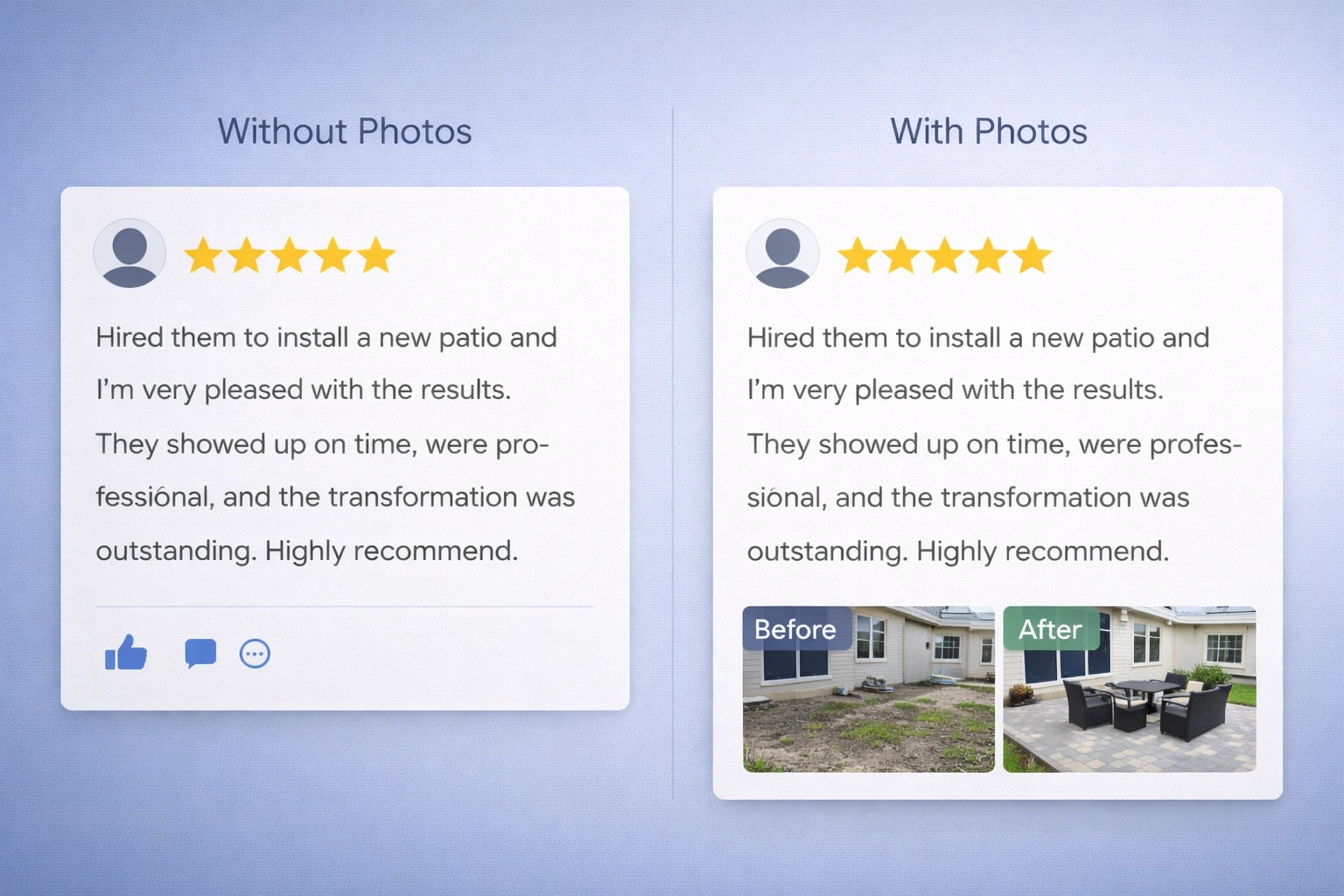
Photos in reviews build trust by showing real results or experiences from customers.
What Are Google’s Review Guidelines You Need to Know Before Posting?
Before you write a review on Google, it’s important to understand and follow Google’s review guidelines. These rules are designed to ensure that every review provides valuable feedback to both businesses and other customers. When you share your honest experience, whether it’s positive or negative, you help other customers make informed decisions and give businesses the insights they need to improve.
Can You Write a Google Review Without a Gmail Account or Anonymously?
Google does not allow you to post an anonymous review. To write a review on Google, you must be signed into a Google account, anonymous reviews are not supported. Your review will always be linked to your Google account, and both your name and profile picture will be visible to the public when your review is posted. Even though your Google account does not have to be a Gmail address, true anonymity is not possible on Google reviews.
You can create a Google account using any email you already have, such as a work email or Yahoo address, and use that account to write reviews. However, Google removed the option for anonymous posting years ago to reduce fake reviews and abusive content. This limitation around anonymity helps cut down on spam and makes it harder for competitors to post fake negative reviews.
Your public profile displays your name and photo to others who see your reviews. You can adjust what name and photo appear in your Google account settings, some people use a nickname or first name only. While this offers a degree of privacy, it does not make your review anonymous, as Google’s rules require all reviews to be associated with an identifiable account.
For business owners, tracking how quickly new reviews come in is called review velocity. It’s one of the signals that can affect local search rankings.
How Do You Create a Google Account with a Non-Gmail Email?
Here’s how to set up a Google account using your existing email:
- Go to accounts.google.com
- Click “Create account”
- Choose “For myself” or “For work”
- Click “Use my current email address instead”
- Enter your existing email address
- Google sends a verification code to that email
- Enter the code and set a password
After that, your account works exactly like a Gmail-based account. You can sign into Google Search, Google Maps, and leave reviews on any business.
How Can You Edit or Delete a Google Review You’ve Written?
You can change or remove your own reviews anytime from your Google account. Businesses cannot edit or delete what you wrote. They can only respond to your review or flag it if they believe it violates Google’s policies.
What Are the Steps to Edit or Delete Your Google Review?
- Open Google Maps (app or website)
- Tap or click your profile icon
- Select “Your profile” or “Your contributions”
- Choose “Reviews”
- Find the review you want to change
- Click the three dots menu and select “Edit review” or “Delete review”
If a business fixes a problem you wrote about, consider updating your review instead of deleting it. An updated review that shows both the original issue and how it was resolved can be more helpful to other customers than either a pure negative or pure positive review.
At L3ad Solutions, we recommend our clients respond politely to critical reviews. When business owners show they care about fixing problems, customers are more likely to revise their negative feedback.
When Should You Update a Google Review Instead of Deleting It?
If a business corrected the issue, an updated review showing both the original problem and the fix is powerful. It tells other shoppers that this business takes customer feedback seriously and actually makes things right.
Here’s a Space Coast example: a Titusville company got a 2-star review because the technician was late and didn’t clean up properly. The owner called the customer the next day, apologized, sent someone back to clean, and waived the service fee. The customer updated their review to 4 stars and mentioned the follow-up. That updated review led to more calls because it showed the company cares about customer experience, even when things go wrong initially.
When updating, adjust your star rating if appropriate and add a short note explaining that the situation was resolved. Something like: “Update: Owner reached out and fixed the problem. Raising my rating to reflect the follow-up.”
How Do Businesses Use Google Reviews to Grow?
How Can Reviews Benefit Local Businesses in Florida?
Businesses should encourage honest reviews from real customers, make the review process easy with direct links or QR codes, and respond to every review, both positive and negative feedback.
Reviews connect directly to local SEO performance and Google Maps rankings. In Florida, where over 3 million small businesses compete for attention, standing out in local search is critical. Our Florida Local Search Index and local search research show clear patterns: businesses with more recent reviews and higher average ratings tend to appear more often in local search results and get more clicks, especially in competitive markets like the Space Coast.
L3ad Solutions builds websites and Google Business Profile services designed to highlight reviews and track which calls, form fills, and bookings come from search traffic. We help clients set up simple review request systems that follow Google’s rules. For businesses thinking about AI search and voice assistants, we also offer AI search optimization services that prepare your content for the next generation of search. Our professional web design integrates review displays and testimonials directly into your site, turning those Google reviews into conversion tools.
If you want help turning reviews into more leads and sales, request a free audit and we’ll show you exactly where you stand and what to improve.
How Should Businesses Respond to Reviews?
Managing your business’s online reputation means more than just collecting reviews, it’s about engaging with your customers through thoughtful responses. Whether you receive positive feedback or negative reviews, how you respond can make all the difference in how your business is perceived online.
For positive reviews: Always thank your customers for taking the time to share their experience. Acknowledge specific details they mentioned, and let them know you appreciate their support. This not only encourages repeat business but also shows potential customers that you value feedback and provide exceptional service.
For negative reviews: Respond promptly and professionally. Start by apologizing for any inconvenience, then address the customer’s concerns directly. Offer a solution or invite them to continue the conversation offline to resolve the issue. This demonstrates your commitment to customer service and shows that you take negative feedback seriously.
How Can Businesses Measure the Impact of Google Reviews?
Understanding the impact of your Google reviews is essential for any business looking to grow and improve customer satisfaction. Review analytics allow you to track and measure how your reviews influence your business’s reputation and customer decisions.
What Does the Future Hold for Google Reviews?
Google reviews are evolving rapidly, and staying ahead of the latest trends is key to maintaining a strong online reputation. As online reviews become even more influential in local search results, businesses with a strong review profile are more likely to attract new customers and stand out in search.
Tap a question to expand.
How quickly can I write a Google review?
Why is my Google review not visible?
Can a business remove my Google review?
How long do Google reviews remain online?
Is it allowed to review my own business on Google?
Do Google reviews impact search rankings?
What if a business asks me to alter my review?
What if I reviewed the wrong business location?
Or start with a free AI visibility check
Does AI Recommend You?
See if ChatGPT, Gemini, Grok, and Claude name your business. Free report by email.